Common Human Resources System (CHRS)
-
What is CHRS?
CHRS is the new MyHR PeopleSoft system that will replace current HR platforms across the CSU. With a modern interface and mobile-friendly design, CHRS will provide improved navigation, enhanced self-service capabilities, and consistent HR process for all campuses.
-
Why CHRS?
The new system will deliver significant benefits, including:
- Efficiency: A united platform for HR, payroll, and benefits, reducing redundancy and manual processes.
- Standardization: Consistent HR processes and reporting across all CSU campuses.
- Security: Stronger protocols to safeguard employee data.
- Accessibility: Mobile access and a more user-friendly experience for faculty, staff, and administrators.
-
What does this mean for CSUEB?
Faculty, staff, and administrators will see changes in how HR-related tasks are completed as processes are standardized across the CSU. While this may require some adjustment, the long-term advantages include streamlined operations, better reporting capabilities, and improved support.
-
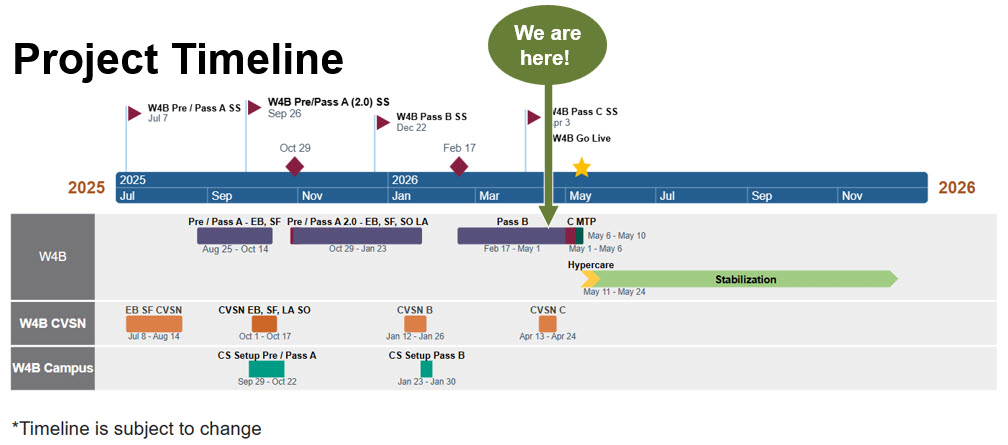
Timeline
-
Stay Connected
We will continue to share updates and resources as we move through this transition together. In the meantime, you can explore the CSU Chancellor’s Office CHRS site.
If you have any questions, please reach out to Dr. Victoria Morris (victoria.morris@csueastbay.edu) or Dr. Hernandez (rafael.hernandez@csueastbay.edu).